Solutions · Kubernetes

Kubernetes Architecture Designs.

Production-ready Kubernetes on Amazon EKS, Azure AKS, Google GKE and DigitalOcean Kubernetes: designed for security, uptime and cost from day one, delivered as code, and independently audited before you go live.

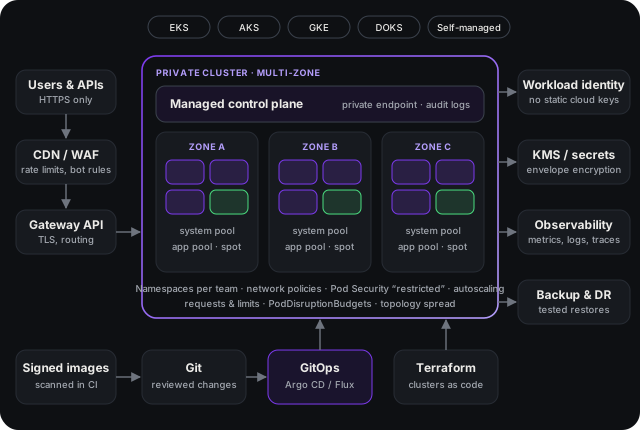
Kubernetes reference architecture: traffic through a WAF and Gateway API into a private multi-zone cluster, with workload identity, KMS, observability, backups and GitOps delivery

Why it matters

Most Kubernetes problems are design problems.

Clusters rarely fail because Kubernetes is broken. They fail because of decisions made in the first weeks and never revisited: a public API endpoint, cluster-admin handed out to keep a deadline, long-lived cloud keys stored as secrets, workloads with no resource requests that starve each other and inflate the bill, everything in a single zone, and upgrades postponed until the version reaches end of support.

We design the platform so the secure, resilient and cost-efficient path is also the easy one for your engineers — then prove it holds with an audit by someone who did not build it.

Platforms

Designed for the cloud you run on.

Each managed Kubernetes service has its own identity model, networking and autoscaling. The design uses what your platform does best instead of forcing one template everywhere.

AWS

Amazon EKS

For teams that want deep AWS integration and full control over how the cluster runs.

  • Managed node groups, EKS Auto Mode or Fargate, chosen per workload
  • Karpenter for fast, right-sized nodes and safe use of Spot capacity
  • EKS Pod Identity or IRSA, so pods never hold AWS access keys
  • VPC CNI address planning, AWS Load Balancer Controller, private endpoint
MICROSOFT AZURE

Azure Kubernetes Service (AKS)

For organisations built on Microsoft Entra ID, Azure networking and Microsoft security tooling.

  • AKS Automatic or Standard, with system and user node pools
  • Microsoft Entra Workload ID and Entra-integrated Kubernetes RBAC
  • Azure CNI Overlay or Azure CNI powered by Cilium, private cluster
  • Azure Policy for AKS and Defender for Containers as guardrails
GOOGLE CLOUD

Google Kubernetes Engine (GKE)

For the most automated managed Kubernetes, and data or AI workloads on Google Cloud.

  • Autopilot or Standard mode, decided by how much control you need
  • Workload Identity Federation for GKE — no service account key files
  • GKE Dataplane V2 network policies, Gateway API, private nodes
  • Binary Authorization and Policy Controller for supply-chain guardrails
DIGITALOCEAN

DigitalOcean Kubernetes (DOKS)

For startups and smaller teams that want managed Kubernetes without the cloud-provider complexity.

  • Managed control plane with the high-availability option for production
  • VPC-native clusters, Cilium networking and DigitalOcean Load Balancers
  • Built-in cluster autoscaling with predictable, flat pricing
  • Secrets and API tokens kept in an external secret store, scoped per app

Running Kubernetes yourself, on-premises or at the edge? We also design self-managed clusters (kubeadm, RKE2, k3s), with the same security baseline.

What the design covers

Nine layers, decided and documented.

Cluster topology & tenancy

How many clusters, per environment or per region; namespaces, quotas and boundaries between teams and tenants.

Networking & ingress

CNI and IP planning, Gateway API or ingress, private endpoints, default-deny network policies and controlled egress.

Identity & access

Single sign-on for engineers, least-privilege RBAC, and workload identity so applications reach cloud services without stored keys.

Workload security

Pod Security Standards, admission policies, image scanning and signing, read-only root filesystems and non-root containers.

Secrets & encryption

Secrets from a managed vault via External Secrets, KMS envelope encryption, TLS everywhere and certificate automation.

Scaling & cost

Requests and limits, pod and node autoscaling, Spot where safe, right-sizing and cost allocation by team or product.

Reliability & DR

Multi-zone node pools, disruption budgets, topology spread, backups with tested restores, and a recovery plan with clear RPO and RTO.

Observability

Metrics, logs and traces with Prometheus and OpenTelemetry, alerts tied to service-level objectives, and audit logs kept.

Delivery & upgrades

Terraform for clusters, GitOps with Argo CD or Flux, environment promotion, and a version upgrade path that keeps you supported.

Choosing a platform

EKS vs AKS vs GKE vs DOKS, at a glance.

Amazon EKSAzure AKSGoogle GKEDigitalOcean DOKS
Best fitAWS estates; teams that want full controlMicrosoft and Entra ID estatesMost automated operations; data and AIStartups and small teams; simple pricing
Hands-off modeEKS Auto Mode, FargateAKS AutomaticAutopilotManaged control plane, HA option
Node scalingKarpenter or Cluster AutoscalerNode auto-provisioning or Cluster AutoscalerCluster autoscaler, node auto-provisioningBuilt-in cluster autoscaler
Pod identityEKS Pod Identity, IRSAMicrosoft Entra Workload IDWorkload Identity FederationScoped tokens from a secret store
NetworkingAmazon VPC CNIAzure CNI Overlay / CiliumDataplane V2 (eBPF)Cilium
GuardrailsKyverno or Gatekeeper; GuardDutyAzure Policy; Defender for ContainersPolicy Controller; Binary AuthorizationKyverno or Gatekeeper

Cloud features change often; every design is checked against the provider’s current documentation and your region.

What to expect

How this engagement runs.

Discover & assess

Workloads, traffic, data, compliance needs, team skills and budget — or a review of the cluster you already run.

Design & decide

Target architecture, platform choice and a written decision record for every trade-off, agreed with your team.

Build the foundation

Terraform, GitOps and the security baseline as code, with a reference cluster your services can move onto.

Validate & hand over

Independent security audit, failover and restore tests, then runbooks and a walkthrough for your engineers.

Deliverables

What you keep.

Architecture document

Diagrams, data flows, trust boundaries and the reasoning behind each major decision.

Infrastructure as code

Terraform modules for clusters, networking and identity, plus the GitOps repository layout.

Security baseline

Policies, RBAC and network rules as code, mapped to the CIS Kubernetes Benchmark.

Runbooks

Upgrades, scaling, incident response, backup restore and disaster recovery, step by step.

Cost model

Expected monthly cost by environment, with the levers that move it most.

Audit report

Independent findings, ranked by risk, with the fix and retest status for each.

Questions

Kubernetes architecture, answered.

Should we choose Amazon EKS, Azure AKS or Google GKE?

Usually the cloud you already run on. Identity, networking, billing and the managed databases your services depend on matter more than the differences between the Kubernetes services themselves. GKE offers the most automated experience (Autopilot), EKS the deepest AWS integration and the most control, AKS fits naturally into Microsoft Entra ID and Azure estates, and DigitalOcean Kubernetes (DOKS) is the simplest option with predictable pricing for smaller teams. We compare them against your workloads, team and budget, and write the reasoning down so the decision can be revisited later.

Do we actually need Kubernetes?

Not always. If you run a handful of stateless services, a simpler platform such as AWS ECS, Google Cloud Run or Azure Container Apps can be cheaper to run and easier to staff. Kubernetes earns its keep when you have many services, several teams, portability requirements or workloads that need fine-grained control. If our assessment says a simpler platform fits better, that is what we recommend.

Can you design for multi-cloud or hybrid?

Yes, with care. Kubernetes gives you a common way to deploy, but networking, identity, storage and managed services still differ per provider, so true multi-cloud adds real cost. We design for it when there is a clear driver, such as regulation, data residency or customer requirements, and otherwise keep you portable without paying for a second cloud you do not need.

How do you secure a Kubernetes cluster?

In layers: a private API endpoint, workload identity instead of static cloud keys, least-privilege RBAC, network policies that deny by default, Pod Security Standards at the restricted level, admission policies (Kyverno or OPA Gatekeeper), signed and scanned images, encrypted secrets and audit logging. The baseline is mapped to the CIS Kubernetes Benchmark and the NSA/CISA Kubernetes Hardening Guidance, and checked by an independent audit before handover.

Can you review or redesign a cluster we already run?

Yes. We start with an architecture and security review of the existing cluster, rank the findings by risk and effort, and plan the changes so they can be rolled out without downtime, including Kubernetes version upgrades that have fallen behind.

What do we receive at the end?

An architecture document with diagrams, a decision record for each major choice, Terraform for the clusters and their cloud dependencies, the GitOps repository layout, the security baseline as code, runbooks for upgrades, scaling and disaster recovery, a cost model, and the audit report.
Planning a new cluster, or worried about the one you run?

Tell us your platform, workloads and timeline. We will follow up with a scoped proposal.